Odoo CRM — Kuwait
Close More Deals.
Lose Fewer Leads.
Your sales team gets leads from WhatsApp, email, phone, walk-ins, and your website. Odoo CRM captures every single one and makes sure nothing falls through the cracks.
Book a CRM Demo WhatsApp Us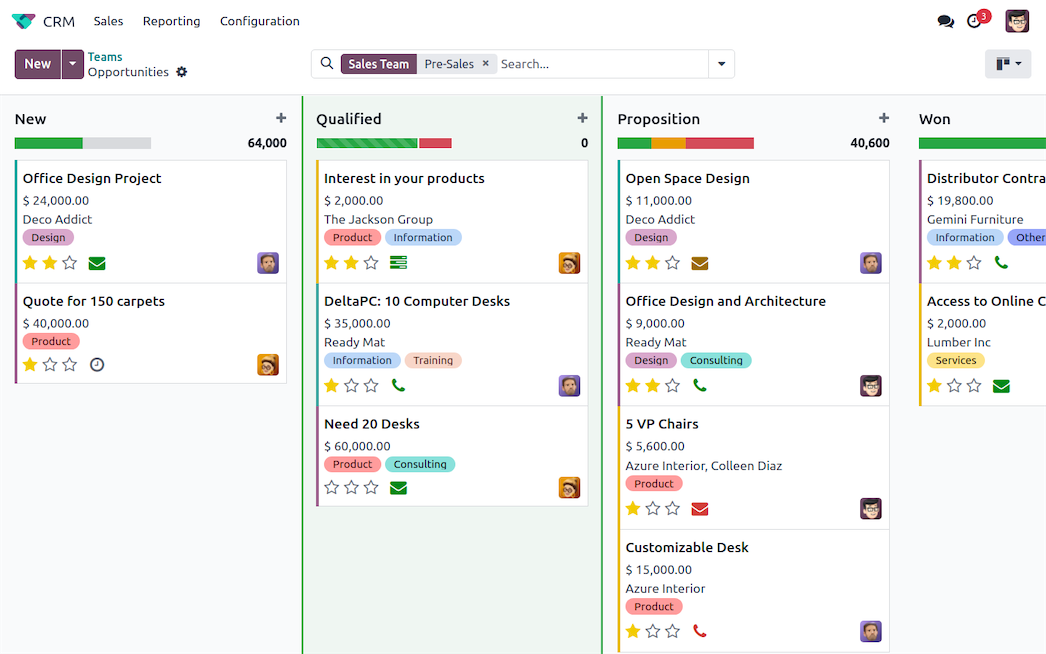
79%
of leads never convert due to poor follow-up
48h
average response delay kills deal probability by 60%
3x
more deals closed with structured pipeline management
1
system to replace your spreadsheets, sticky notes & memory
Keep Opportunities Within View
Your pipeline at a glance. Each opportunity is listed as a card with all essential information. Each stage gives an overview of your expected revenues.
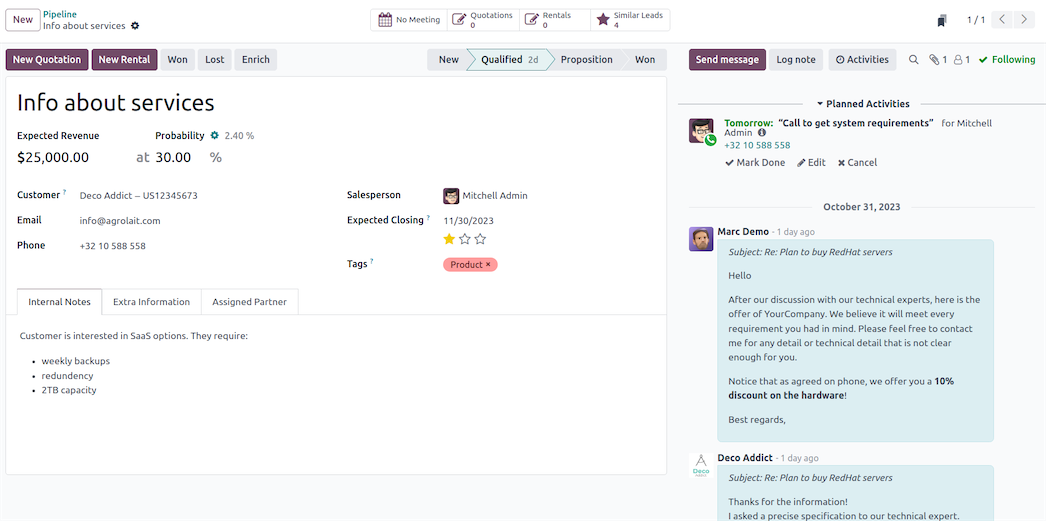
The Kanban view organizes opportunities by stage. Drag and drop them to move deals forward. Schedule calls, meetings, mailings, or quotations, and Odoo automatically plans the next activity based on your sales script.
What Changes When You Use a Real CRM
Without CRM
Leads tracked in spreadsheets, WhatsApp chats, and memory
Follow-ups forgotten — nobody knows who called whom
No revenue forecast — management guesses pipeline value
Salespeople hoard contacts in personal phones
When someone quits, their deals disappear with them
With Odoo CRM
Every lead from every channel lands in one pipeline
Automated reminders ensure follow-up within hours
Real-time forecast with probability-weighted revenue
All contacts owned by the company, visible to the team
Full deal history survives staff changes
Attractive Quotations in Two Clicks
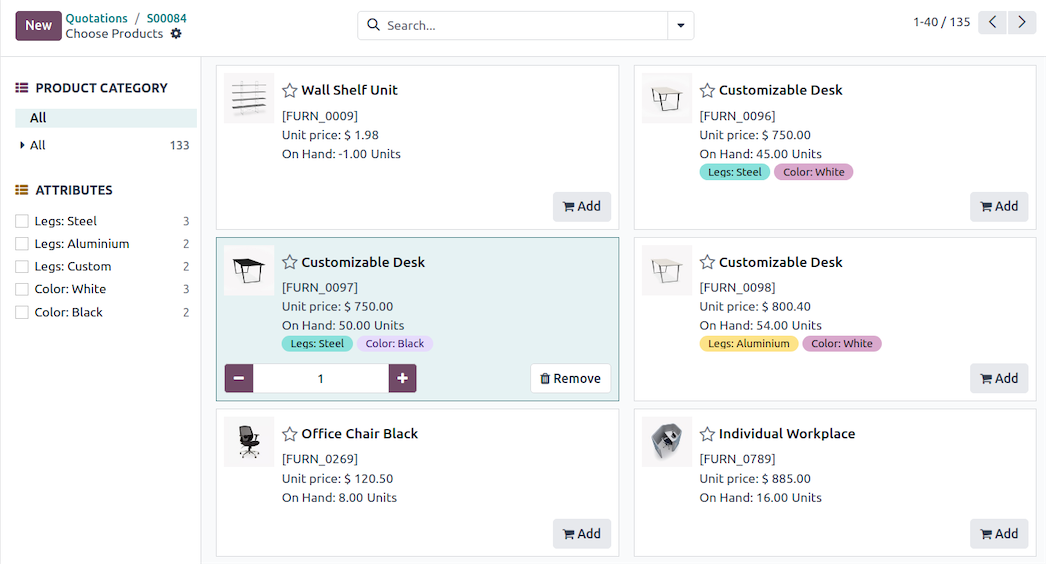
Create professional-looking quotations in no time with a user-friendly interface. Select products from the catalog, add options, payment terms, and validity dates. Customers accept and sign online. You get notified the second they do.
Branded templates E-signature
Online payment Auto follow-up
Turn Reporting Data Into Revenue
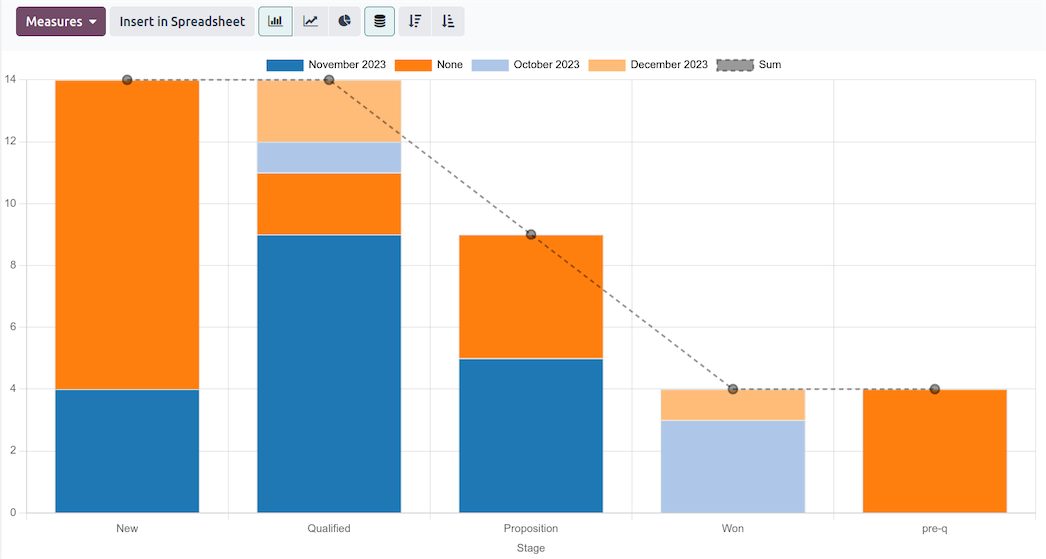
Smart decisions are based on accurate and real-time data. Dig deeper into your sales metrics with revenue forecasts, team performance analysis, and custom dashboards.
Revenue forecasting
Salesperson leaderboards
Win/loss analysis by stage
All the Features Done Right
Not a contact database. A deal-closing machine.
Visual Pipeline Management
Drag-and-drop Kanban board with customizable stages. Color-coded priorities, revenue probability, and stale deal alerts. Managers see all team pipelines on one screen.
Automated Activities & Follow-ups
Schedule calls, meetings, and emails from each deal. Automated reminders ping salespeople before follow-ups expire. Build email sequences that nurture leads automatically.
Multi-Channel Lead Capture
Website forms, email aliases, live chat, social media, and manual entry. Every lead lands in the pipeline with full source tracking. Duplicate detection prevents duplicates.
VoIP & WhatsApp Integration
Click-to-call from any contact. Calls logged automatically. WhatsApp Business integration for the channel Kuwait customers actually prefer. Full conversation history on every record.
One Deal Triggers Your Entire Operation
When a salesperson wins a deal, everything downstream starts automatically.
Deal Won
Salesperson marks opportunity as won in the pipeline
Sales Order Created
Quotation converts to confirmed order with all line items
Delivery Scheduled
Warehouse gets picking order, inventory reserved automatically
Invoice Sent
Customer invoiced, payment tracked, revenue recognized

How ITHorizon Sets Up Your CRM
1 Map your sales process — we interview your team and document how deals actually move
2 Configure pipeline stages — your real workflow, not generic defaults
3 Migrate your data — contacts, deals, and history from spreadsheets or old CRM
4 Set up automation — lead assignment, follow-up rules, email sequences
5 Build your templates — branded quotations, email templates, report formats
6 Train your team — hands-on sessions for salespeople, managers, and executives
Common Questions About Odoo CRM in Kuwait
Can I import my existing leads and contacts?
Yes. We migrate everything — contacts, deal history, notes, and communication logs. Whether you are coming from spreadsheets, another CRM, or scattered email threads, we consolidate it all.
Does it work on mobile?
Full CRM access from any mobile browser plus native iOS and Android apps. Log calls, update deals, check pipeline, and approve quotations from your phone.
Does it integrate with WhatsApp?
Yes. Odoo supports WhatsApp Business integration for sending and receiving messages within the CRM. This is critical for Kuwait where WhatsApp is the primary business communication channel.
How fast can we go live?
Standard CRM implementation takes 1 to 2 weeks. Multi-team setups with advanced automation and data migration may take 3 to 4 weeks. Your team is selling from the new system within a month.
Your Leads Deserve Better Than a Spreadsheet
Book a free CRM demo. We will show you the pipeline configured for your industry and walk your team through how it works.
Book a CRM Demo WhatsApp Us